
Assistant
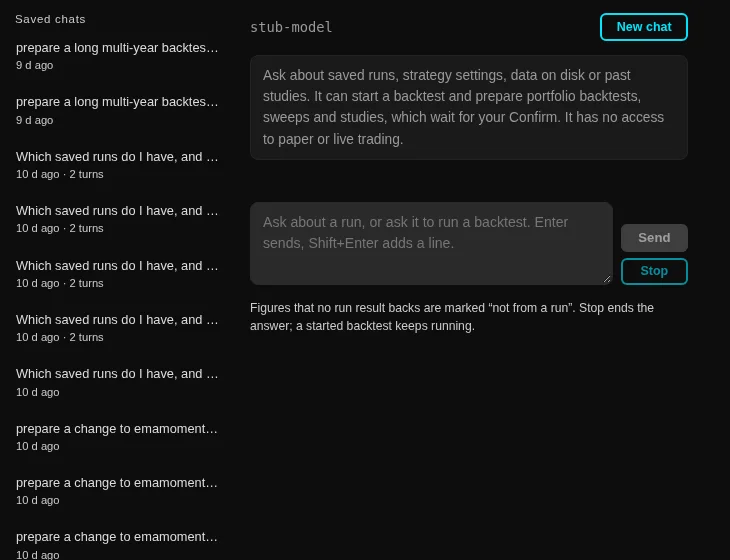
A chat with the model configured in Settings. It works as a researcher rather than a chatbot: every fact it states comes from a tool it called, and every figure it quotes is a figure the engine returned.
What it can look up
- Saved runs: the list, one run, a page of its trades, and a comparison of two.
- Strategies and their settings.
- Datasets, their coverage and the coin lists.
- Past studies and the latest one.
What it can start
It can start a single backtest, a portfolio run, a sweep or an optimisation study, and it can check or cancel what it started. A heavy run is prepared, not begun. A portfolio backtest, a sweep, an optimisation study, or a single backtest past the heavy threshold all come back as a card naming the exact settings and the window, with a Confirm and start button. Nothing runs until you press it.
One heavy run at a time carries the same rule here as everywhere else in the app. A start refused because another heavy job holds the slot does not use up the card: the reason appears next to a Try again button, so the same job starts once the slot is free without asking the model again. After the click the card grows its own progress rail, and its cancel goes through the same cancel the pages use.
What it can never reach
Paper and live trading, instances, positions, orders, accounts, the daily-selection portfolios, fleet settings, the kill switch, strategy builds, deletes, downloads and the raw data store sit outside its tool list, and no card on the page opens into them. The list is fixed, which means the assistant cannot be talked into a route it was not given.
Figures are traced, or they are marked
Every tool call draws a card: what it called, the arguments it used, how long it took, where the result came from, and a link that opens that run or study in the app. Show the result reveals the stored result itself, which is how you check a number the model just quoted.
After each answer every number in it is checked against that turn's evidence, meaning your question, the arguments of each call and each result. A figure nothing grounds is drawn in gold with a dotted underline and a not from a run note, with one line under the answer naming them. Nothing is removed from the answer, because the mark is information: it tells you which figure to check before you use it. Hovering a figure that a result does hold names that result.
A percentage is checked on its own scale. A figure written with decimals is compared at that precision, while a whole-number percentage has to sit close to the run's own percent, so a rounded-up statement is marked too and you can see that it is a rounding.
The boundary before you send
The header names the active model. When that model cannot take tools in the normal field, a chip says so, because the assistant then writes its calls as text. When the endpoint is not on this machine, the header says external model, shared items only before you send anything. What an external model may see is set in Settings under the share levels, and the filter runs on the bytes leaving the engine: an unshared strategy's name in your own question refuses the send and names the item.
Stop stops the answer
Stop ends the model's reply. A backtest it already started keeps running and keeps its own cancel on its card. Losing a finished run because you stopped reading would be a bug.
Saved chats
Every finished answer is saved on the engine and listed in the left column, newest first, titled by its first question. Opening one draws that chat again, with the questions, the answers, every tool card and the marks on the numbers, straight from the file, so it is the chat as it happened and nothing is re-run. A reload starts a new chat; the list is one click away.
Two limits worth knowing. A large chat is capped at 2 MB, and past that the oldest exchanges are dropped with a line saying how many. A Confirm button only lives as long as the engine process, so a reopened chat shows what was prepared without offering a click the engine can no longer honour.
Handing a change to the studio
Ask for a change to a strategy and the card carries a button that opens the studio's describe-a-strategy chat with the description already written. Nothing has changed at that point. The edit starts only when you press the studio chat's own Change it and then Save.