
History and compare
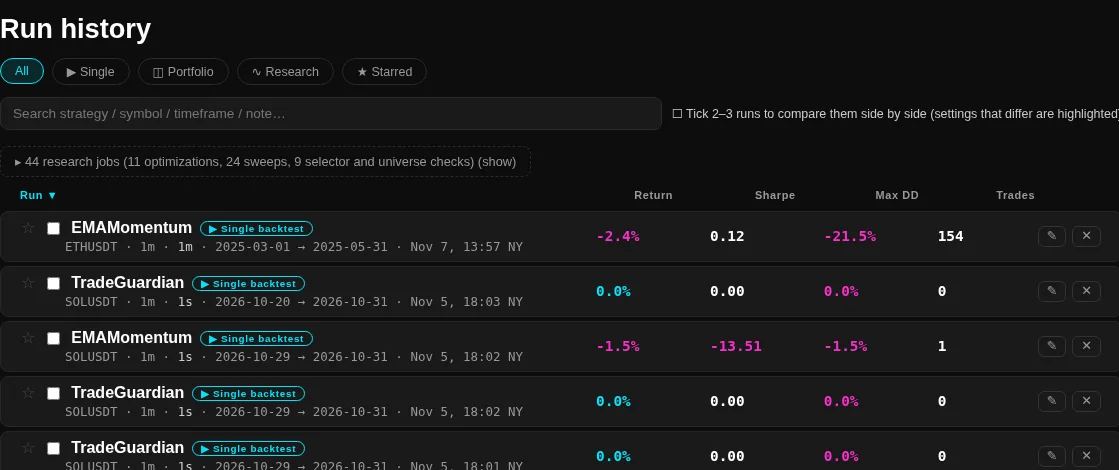
Every run and study you finish is listed here, newest first, with the numbers that decide whether it is worth opening.
The filters
- All, which is runs and studies together.
- Single for single-coin backtests, Portfolio for portfolio and combined runs.
- Research for optimisations, sweeps and selector or universe checks.
- Starred for the runs you saved as favorites.
The search box covers strategy, symbol, timeframe and note. A search that matches nothing says so instead of showing an empty list that looks like a failed load.
Research jobs are folded into one line on the All filter, with a count and a breakdown by kind, because a sweep or a selector check is not a result you read the way you read a backtest. Open the line and the Research filter takes over.
The columns
- The strategy, its symbol, the timeframe and the window, plus the run type as a chip.
- Return, Sharpe, Max DD and Trades. These come from the summary the run already stored, so the list paints without loading a single result.
- The date and the clock time of the run, in New York time, so a run lines up with the candles it traded.
Returns above and below zero are coloured differently and a flat run stays neutral. A run with no trades is listed like any other, because zero trades is a result about the settings rather than a failure of the list.
Compare
Tick two or three runs and the compare view opens them side by side with the settings that differ highlighted. It answers the question you actually have after a change: what did I change, and what did it do to the numbers.
Opening and keeping a run
- Click a row to open its report, see Results and statistics.
- A star saves the run as a favorite, so it stays reachable when the list moves on.
- The delete control removes the run from the store. A run whose result file is gone says so instead of opening an empty page.
- A link that names the history opens it even if you were last in the live environment, see Dashboard for the rest of the view-state rules.