
Strategies and the studio
A strategy is a folder of source code, compiled into a build the engine can load. The Strategies page lists what is built and what is not, the studio shows what a strategy does and lets you change it, and every path into a running instance goes through a build.
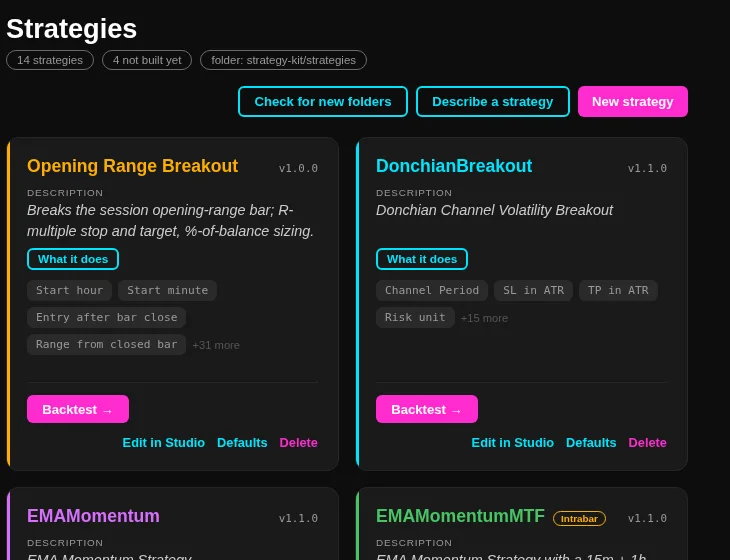
The page
The chips under the title count the strategies, the folders that are not built yet, and the folder a new strategy is written into. The toolbar holds three actions: check for new folders, describe a strategy, and new strategy.
Each card carries the state, a plain-English line on what the strategy really does with the whole summary one click away, four parameter chips and a count of the rest, and exactly one primary button beside its secondary ones. A kit strategy that reads the forming bar wears a gold Intrabar label, because it can act before the bar closes.
Where strategies come from
Below the cards, Strategy sources lists every strategy folder, with its state: not converted yet, not built yet, or built. A folder that is not built has no summary and no parameters, so it cannot be a card. Building it is what turns it into one, and the strategy list refreshes when the build succeeds, without a restart.
New strategy asks for a name and which example to copy, creates the copy and builds it at once. The examples are short, follow the kit's code style, and build and backtest through the app. A framework example is read only: it can be copied into your strategies, and the copy is what you edit.
Builds
- One build runs at a time, in the page and in the shell alike.
- A rebuild is refused by name while a paper or live instance runs on that strategy's current build, because the build would replace files the instance holds open. Instances pinned to a retained older build are not affected.
- While a strategy builds, an instance of it cannot start. It says so, and you start it again when the build is done.
- A failed build keeps the compiler errors in the log.
The checks a kit strategy must pass
Every build of a kit strategy runs two checks over the source folder before it compiles. The safety check refuses banned APIs, file and network access, process starts, reflection, unsafe code, threads and timers, environment reads, dynamic and expression trees, with the file, line and rule of each finding. The style check refuses code that breaks the kit's written style rules.
A build with findings is refused and names them. Hand-written strategies are not checked, and a test strategy skips the style check only: safety always applies. The check is a guard against accidents, not a sandbox against a deliberate author.
A kit strategy must have a stop. A strategy with no stop refuses to start, and the app never makes one up. No target anywhere means a stop-only trade; a target on one side only is refused.
The studio
Edit in Studio opens the strategy in the main frame, so the sidebar and the top bar stay where they are. The header carries the one way out. The strategy is shown as its parts, overview, settings, conditions and rules, plus indicators and trade management when the folder has them, each with a plain summary.
- Edit this file edits in place, with Save and Cancel. A strategy in the framework's own folder is read only and says so, offering a copy under a name you confirm instead.
- Check runs compile, style and safety, and the check panel shows four rows: compiles, style, safety and quick backtest. Each finding has a jump to its line.
- Quick test runs ZECUSDT on one-minute bars over a fixed week and reports the trade count in the check panel, without leaving the studio.
- Build builds and stays in the studio, and the header state tracks what happened: not built, built but not checked, edited and to be checked again, or built with the number of findings.
Changing a strategy with the model
Change with the model takes a request such as making the stop two ATR and changes only what was asked. Nothing is written before Save. The panel lists one row per file with changed, unchanged, new file or removed, the line counts, and the coloured diff, with the whole file one click away. A file the answer dropped is called out and refuses the save. Saving says to build it, and the ordinary build button makes the new build, so a model's edit is checked like any other edit.
Writing one from a description
Describe a strategy opens a chat. Give a name and a description and the draft streams in as a strategy folder. The draft is compiled, safety-checked and style-checked, and every finding goes back to the model as another try, up to the configured number of tries. A draft that compiles is also started once by the engine with no bars, the way a run starts it, so a start refusal is another finding rather than a surprise later.
Save as strategy saves exactly the model's files, builds them and opens the backtester on the new strategy, then runs a quick minute test and opens its result. A problem in the environment, such as a missing engine binary or a timeout, is never blamed on the model: the log says the start check was skipped and the draft continues.
The chat's settings card holds the endpoint, the model name, the number of tries and whether endpoints on other machines are allowed. A remote endpoint is refused unless that box is ticked, and an API key never enters the app: it is set in the environment where the engine runs, and the card only shows that it is set.
Deleting a strategy
The quiet Delete on a card asks first and names what goes: every paper and live instance running that strategy, every saved result that used it, and its build with every retained version. Its code is never touched. The folder reappears under Strategy sources as not built yet, and setting up and building brings the strategy back from the same code. Removing the code itself is a file operation on disk.