
Connecting Bybit (demo first)
Live trading runs the same instances as paper trading, against a real Bybit sub-account. This page connects one, and it starts on the demo network on purpose: a demo account gives you the venue's real order path, real rejects and real fills without putting money behind them.
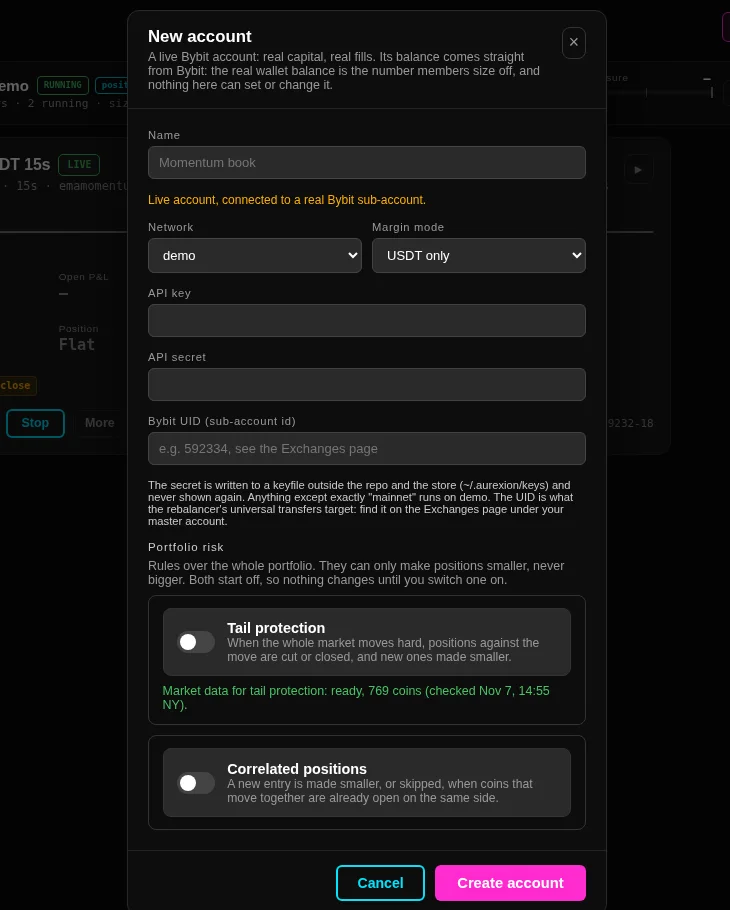
The account and its key
- Network is demo or mainnet. Anything except exactly mainnet runs on demo.
- Margin mode is USDT only or unified rebalance, which only matters when a master account moves funds between sub-accounts.
- API key and API secret belong to that Bybit sub-account and need trading permission. The secret is written to a keyfile outside the repo and outside the store, and the app never shows it again.
- Bybit UID is the sub-account's own id. It is what the rebalancer's transfers target, and the Exchanges page shows it for every account under a master.
The account can be given the same two portfolio risk rules as a paper account, and they can only make a position smaller.
Leverage is set at the entry
Bybit ties leverage to a risk tier, and a higher leverage means a smaller maximum position, so the leverage a trade should run at depends on the size of that trade. The engine therefore sets the coin's leverage on the venue just before an entry: the highest leverage whose tier still holds the whole exposure of the position, its resting orders and the order being placed, and whose margin fits. It repeats the call after a restart, which changes nothing.
A brand-new demo account can still refuse an order with retCode 110090 before anything has been sized. If that happens, raise that coin's leverage once in the Bybit interface and start the instance again; the account's own values are on the Exchanges page.
The balance is the venue's number
A live account carries no balance of its own. What the header shows is the wallet balance Bybit reports, stamped with the moment it was read and shown with its age, and every size an instance takes is computed against a fresh read rather than a stored basis.
Until that first read lands the account reads BYBIT UNVERIFIED with its equity as a dash, because a creation-time snapshot is not a balance. A value older than five minutes is marked stale, and a failed read names the account and the reason in a red line on the page instead of leaving the last number in place.
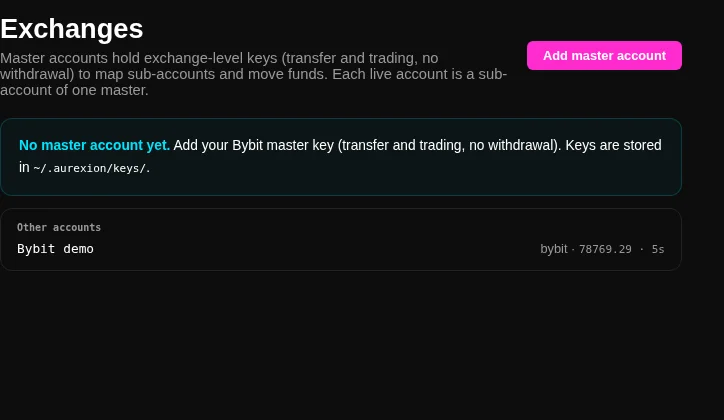
The master account, and what it is for
A master account holds an exchange-level key with transfer and trading permission and no withdrawal permission. It maps the sub-accounts and moves funds between them, and nothing is ever traded on it. A sub-account's UID is fetched when the master is created, and the page shows every UID with a marker for whether it can receive a transfer at the moment.
The daily rebalancer uses that map to move money between sub-accounts so each one runs at its share. It asks for the settled transferable balance rather than the wallet balance, because Bybit refuses to move margin locked behind an open position, so a leg that cannot move in full moves what it can and says so; the remainder waits for the next rollover.
First run
Create the account, then create an instance on it. Live instances are created exactly like paper ones, except that a live instance is always live: there is no second setting that could quietly make it a simulation, and only live accounts are offered in the form.
Watch the first order go out rather than assuming it did. The Orders tab shows what is resting on the venue, the Executions tab shows the fills the venue reported, and the KILL button on the Instances page flattens everything and stops it, which is the control to know before the first trade rather than after it.