
Data
Market data on this machine, grouped by the store it came from. A backtest, a portfolio run and a paper instance all read the same files, so what this page lists is the whole supply the rest of the app draws on.
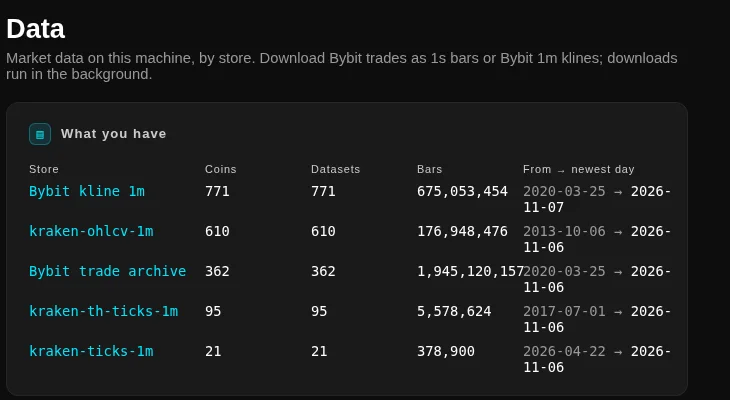
What you have
The first card counts each store the machine can read: its coins, its datasets, its bars and the range it covers, from the oldest day to the newest. The stores have different jobs. A Bybit trade archive holds ticks, which a backtest turns into the bars of whatever trading timeframe it needs. A Bybit kline store holds minute bars as the venue published them, which is what the screener reads. A Kraken store holds its own minute history.
The same symbol in two stores is two rows on purpose, and each row names its store. A symbol that arrived both as venue klines and as an archive is not one dataset with two lives, and the page does not pretend it is.
The dataset list
Below the store counts, every dataset gets a row: the symbol, the instruments behind it, the Source with its store in a tooltip, the resolutions it holds, the bar count and its range. The list opens on the ten datasets with the most bars, and Show all lists the rest. A search box filters by symbol prefix across every store at once.
Deleting is offered only where deleting is the app's job, which is the primary data store. A store filled by an ingest driver is left to that driver.
Downloading
Search a symbol, pick it from the matches, and the form fills in the archive range the venue has for it, with the tick size and lot step the instrument trades in. Choose a start and an end day and press Download & aggregate. The two sources are the venue's trades, which become one-second bars, and the venue's minute klines.
Downloads run in the background, so you can leave the page and keep working. Progress is on the card and in the sidebar's active jobs. Stopping one keeps the days that already arrived: a partial download is a valid dataset, and the next run fetches the rest. Days you already have are skipped, so a second download of the same month costs only the missing days.
The whole-universe download for minute klines asks first and names its size, because it is a different order of magnitude. It also tops up rather than starting over.
The integrity check
Two buttons. Quick check walks each day of a dataset and compares the bars against the ticks behind them, without touching the network. Full check adds the soundness pass and a daily cross-check against the venue, so it reads ticks and makes requests, and it takes longer.
The result is a verdict line and a row of bars, one segment per dimension, and clicking a bar opens the detail behind it. A checked dataset keeps its result, so the page can show you the verdict from the last run without checking again.
Coins that were provisioned for a universe hold only the days the universe needed. Their coverage is partial by design, and the page says so next to the verdict instead of calling it damage.
Where the data lives
The page names the store it is reading, and the engine takes the store as a setting rather than assuming one. A machine with the data on a second disk points at it and the app lists what is there, without copying anything into the app folder.