
Setting up paper
Paper trading runs your strategy against the live market with simulated fills, on a separate account that never touches an exchange. This page takes you from nothing to a running instance.
The paper environment
The header's three system chips switch between the Backtester, Paper Trading and Live Trading. Paper is an environment of its own, not a page inside the backtester: it has its own sidebar (Dashboard, Instances, Strategies, Settings) and its own home screen, and the app remembers which environment you used last and where you were in each one.
Creating an instance and starting one are the same action. Create and start spawns a long-lived process for that instance, and the card shows a LIVE badge once the market feed is connected and its indicators have been warmed.
An account first
Every instance belongs to an account, and an account is one shared balance with members in it. The members size off the whole balance rather than a slice of it, so four instances of the same strategy each take the full per-trade size, and the account's exposure bar is how you see that they are four positions rather than one.
A new account asks for a name and a starting balance, and offers two portfolio risk rules that can only make positions smaller: Tail protection cuts or closes positions against the whole market's move, and Correlated positions makes a new entry smaller or skips it when coins that move together are already open on the same side. Both start switched off.
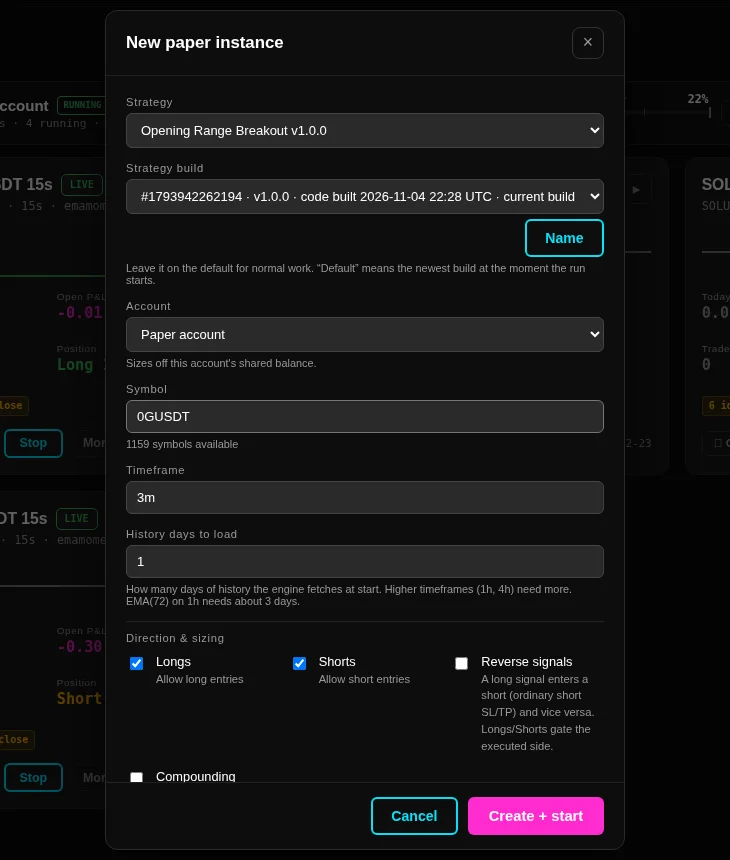
The instance form
- Strategy and Strategy build. The build is the compiled version the instance is pinned to, so rebuilding a strategy later does not change what a running instance does. The default is the newest build at the moment the instance starts.
- Account. Only accounts of the environment you are in are offered.
- Symbol. Type to search the symbols the data store holds, and the line under it counts what is available.
- Timeframe. The trading timeframe the instance reads. Extra timeframes are per-strategy settings, not this field.
- History days to load. How much history the engine fetches at start to warm the indicators. One day is enough for a seconds or minutes timeframe; a 1h timeframe with a 72-bar average needs three days and more.
- Longs and Shorts allow the two sides, and Reverse signals turns a long signal into a short and the other way round while the two boxes still decide which side may trade.
- Compounding sizes off the running balance instead of the fixed starting balance.
Anything you change here is an explicit override for that instance and stays visible on its Config tab. Values you leave alone follow the strategy's paper defaults.
Defaults per strategy
The paper Strategies page holds one defaults row per strategy: the instance basics plus every parameter the strategy reflects. An instance composes its settings in a fixed order, from the strategy's own defaults, then the paper defaults you saved, then the overrides on the instance itself. Paper and live keep separate defaults, so editing one environment never changes an instance in the other.
Warming up, then trading
Before an instance goes live it fetches its history over REST and builds the bars the strategy reads. That history is built from real trades where the engine has them and from the venue's minute klines where it does not, and a bar built from a kline is labelled as one on the chart. When a gap is too large to repair from the recent-trade endpoint the instance is marked DEGRADED on its card, with the reason in the tooltip, rather than carrying a hole silently.
A quiet minute is not a flat bar. When no trade prints before a bar ends, the instance still finishes that bar on time so its clock keeps up: the bar is stored and drawn, the card's idle-close chip counts it, and the strategy is told about it on the next real print rather than on a timer. A bar built from the venue's minute klines that comes back with no volume is refused, so a gap in the tape stays a gap.
What a paper instance cannot tell you
Paper fills are simulated against the live tape, so a fill price can sit where nothing printed, and a stop the market gapped past fills at the next real tick. That is a property of simulation, not a defect, and it does not disappear with a longer run. See Paper versus live for what only a live account can test.
Stopping an instance is safe and never loses the position: the position and its protective orders stay where they are until you close them or the instance trades them. The emergency control is the kill switch, and it acts on live accounts only.