
Entries, stops and take-profit
An entry that the venue accepts is a real position with real orders behind it, and the handful of things that can happen between deciding to enter and being flat again are all visible on one tab.
The entry is sized to the free margin
Before the first order of an entry is sent, every leg of that entry is judged together against the account's free balance at the leverage the coin runs at, with a small headroom for fees and price drift. When the size the strategy asked for does not fit, every leg is cut by the same factor rather than the first leg absorbing the whole shortfall, and the instance's log says so in one line with the numbers that were compared. A leg that the cut would push below the coin's smallest order is merged into the first leg instead, so no part is left to be refused on its own.
When not even the smallest order the coin allows would fit, nothing is sent and the log says the entry was skipped. Paper does the same calculation against its own sizing balance, and a backtest is unchanged, because a backtest has no free margin to run out of.
A part-filled entry says what it got
If one part of an entry filled and a later part was refused by the venue, the position is kept and the log reads how many units are open out of how many were wanted, and why the rest was refused. The part that filled keeps its own stop and take-profit on the exchange, so it is never a position without a bracket.
The stop and the take-profit are the venue's orders
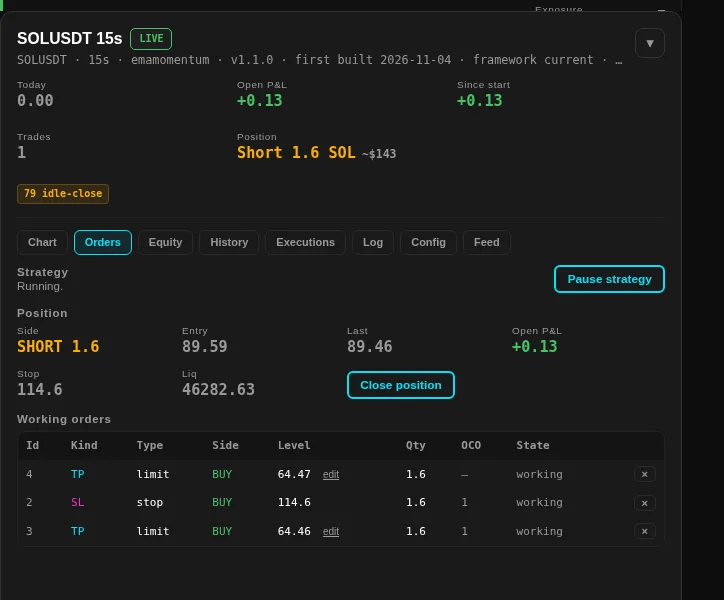
Nothing about the bracket is simulated in live trading. The stop is a stop order on the venue, the take-profit is a limit order, and they are joined in one OCO group so that one of them filling cancels the other. The Orders tab shows exactly what is resting, with each order's level, quantity, OCO group and state, and lets you edit a level or cancel an order by hand if you would rather manage a trade yourself.
The one-tick gap you may see between the two take-profit rows is deliberate, and Stops, take-profit and brackets explains why. The stop a position was adopted with is the venue's stop, and the app takes it as it stands.
Keeping the ledger on the venue's side
- A position Bybit does not hold is cleared. While an instance holds a position it checks the venue once a minute, and at once if a close is refused because the position is already zero. When the venue says flat twice, the app clears its own position and says so, and nothing is sent to the exchange.
- A close is never booked as a new position. Each venue fill carries how much it closed, and it is folded in that way, so a take-profit that lands after the venue's flat message cannot open a phantom position on the other side.
- Funding is a cost, not a fill. Bybit reports funding settlements in the same execution list as trades, and their quantity field carries the position size rather than a traded size. A funding settlement is booked as a cost against the position it was charged on, never as a fill, which is also why it can never raise a false position-divergence warning.
Closing and stopping
Close position sends a reduce-only close to the venue and books the fill that comes back. Pause strategy stops new orders being placed and leaves the resting bracket alone, so the position stays protected while you decide what you want.
Stopping the instance leaves the position and its orders where they are, and the kill switch is the control that removes both.