
Settings
One page for the values the whole app reads: how a simulated fill is priced, which dates are held out of a run, how many results are kept, which theme you work in, and which model the assistant may call. A short index of chips at the top jumps to a section.
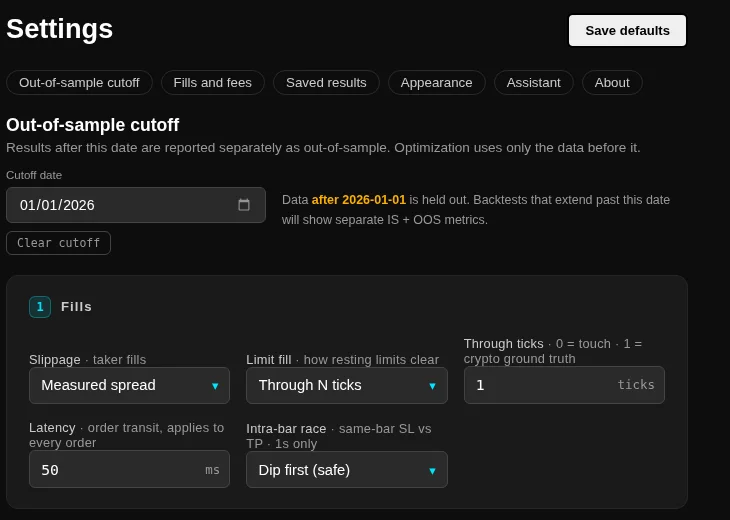
Out-of-sample cutoff
Set a date and everything after it is held out. A backtest that extends past the cutoff reports its in-sample and its out-of-sample numbers separately, and the report carries a chip saying which of the three it is: in-sample only, out-of-sample only, or both. Optimisation fits on the data before the cutoff and nothing after it.
The line under the field says what the current setting means in plain words, and Clear cutoff puts the whole data range back into fitting and evaluation. Nothing is hidden from you when a cutoff is set. The split is shown on the same report that shows the return.
Fills and fees
The defaults every new run starts from. A run can still change them for itself.
- Taker slippage: measured spread pays the half-spread measured from the data, or about one tick when the data has none. Fixed ticks slips a flat number of ticks and ignores the spread. Frictionless prices taker fills at the touched price, which is useful to isolate strategy logic and misleading as a result.
- Limit fill: through N ticks fills a resting limit once price trades N ticks past it, at the limit price, with 0 meaning a touch fills. Volume at level uses the tick data to put the order at the back of the queue and fills it once the given number of lots trade at its price; a take-profit that is only kissed and reverses does not fill.
- Latency: how long an order waits before it reaches the book.
- Fees: the maker and the taker rate charged on each fill.
The note under the fields rewrites itself to describe the combination you chose. The intra-bar race applies to one-second data only. Each of these has its own page in Core capabilities, with the mechanism and the number it moves.
Saved results
Keep the newest N plus Clean up now, which previews the plan and then asks you to confirm it. N counts every run the history lists, so keeping N leaves N rows there. A favourite is never deleted, and neither is a run that another saved run builds on, and both count toward N. Hidden rows, meaning the legs of a sweep and the engine's own test runs, are not counted.
The preview, the confirmation and the background job run the same plan, so the numbers you were shown are the numbers that go. Deleting rows does not return the disk space by itself, so the cleanup then compacts the database; Shrink now does only that. The compaction needs about the size of the database in free disk and refuses by name when it does not have it. A running paper or live instance keeps trading through it, and its trades wait to be written while the compacted copy is made.
Appearance
Five themes, applied at once and remembered in this browser: Space Cowboy, Meridian, Graphite, Desk and Ledger. A theme changes colours, type and corners only. Every number, panel and control stays where it is, so a screenshot from one theme matches another. Visual themes shows both ends of the range.
Show emblems hides the wizard and the diamond with their captions, for a quieter screen.
Assistant
The model the assistant calls, the endpoint it calls, and the share levels that decide what an external model may see. With an endpoint on this machine, nothing leaves it. With one somewhere else, the header of the assistant says so before you type, and the share levels decide which strategies, runs and datasets may travel. The refusal names the item it stopped on.
Licence, logs and About
Licence and plans covers activation, the plan, the expiry and how to move the key to another machine. The Logs section names the log folder, opens it in the file manager of the machine running the engine, and reads the engine log with level and time filters and a copy button. Exchange keys, secrets and the licence key are never written to a log; redaction happens where the line is written.
About shows the package, the version, the licence state and the kind of build, and the terms version you accepted with its date.
Save defaults
The button in the corner confirms itself: it reads Saving, then Saved in green for a moment, so a change you cannot see is not left in doubt.